Chelsea and Westminster Hospital NHS Foundation Trust
Welcome! This is a tailored guide for using Concentric at the organisation. It supports you in getting started and provides details regarding ongoing support should you need it:
About Concentric and why digital consent
Concentric is a digital consent application developed by a small clinically led team. You can read about the team and why we’re working on Concentric. Healthcare software is often difficult to use, slow, and gets in the way; we hope you agree that using Concentric feels pretty different.
The vast majority of clinicians using Concentric state that they prefer it to the traditional paper process, that the quality of the consent process is improved, and that their time is better utilised. Concentric is now used by around 20,000 clinicians each month, reflecting adoption at scale across clinical workflows.
Patients report accessible and clearly presented information, improved shared decision making, and appreciate being able to revisit the information in their own time.
Video guide
This video guide walks through a few clinical scenarios and demonstrates recommended ways to use Concentric in practice. It also shows different approaches clinicians may take depending on the consent scenario and patient context.
Some scenarios may not be relevant to all users and, where appropriate, can be skipped using the video sections. There is a different version of the video guide for ‘read-only’ users here.
Some features and workflows also have more detailed guides:
- Consent Form 2 – Agreement to treatment from an individual with parental responsibility
- Consent Form 4 – Treatment in best interests for an adult who lacks the capacity to consent
- Combined procedures – Combining more than one template to create a consent episode
- Custom templates – How to create, manage and use custom templates
- Additional consents – What they are, when they are used, and the workflow
Test patients:
To get comfortable with using Concentric, many users initially interact with a test patient record; search for patient '80002548' for an adult test patient, or '80075241' for a child test patient.
Access and logging in
If an account has been created for you, Concentric can be accessed from anywhere, on any web-enabled device that meets our browser support policy by going to https://app.concentric.health/open?tenant=chelwest. We recommend saving this link as a browser bookmark or desktop/home screen shortcut for future use.
Concentric can also be accessed via the 'blue button' in the Oracle Health EHR.
You will use your NHSmail (NHS.net Connect) account credentials to log in to Concentric. The easiest way to do so is to use your organisation’s dedicated login link shown above. If authentication is required, this link will take you directly to the correct method.
If at any point you do not have this link to hand, get to the login page by clicking the top right corner button of the Concentric website. From there, select “Log in with NHSmail”.
If you can’t log in – for example, if you see a message asking you to contact an administrator for access – get help via the support and contacts section below.
User responsibilities and terms of use
When you first access Concentric, you’ll be asked to review and agree to the user responsibilities and terms of use relevant to your role. These cover the safe and appropriate use of Concentric, including professional and clinical responsibilities, data integrity and security, and accessibility and patient access. If the responsibilities or terms are updated in the future, you’ll be asked to review and agree to the updated version.
Accessing consent summary PDFs in the EHR
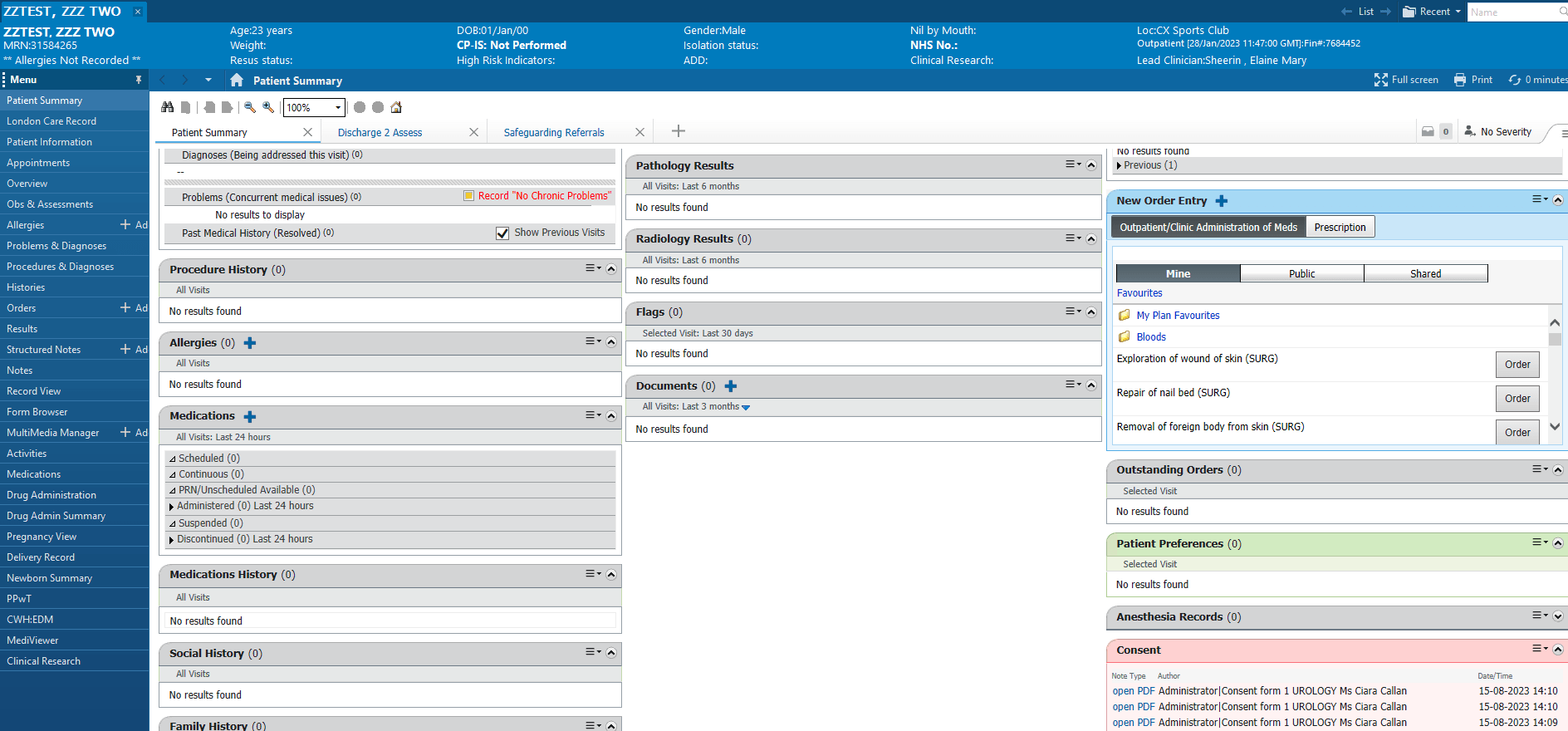
Concentric is integrated with your other clinical systems, allowing consent summary PDFs to be automatically transferred into Evolve (CWH:EDM tab within the Oracle Health EHR). These PDFs are designed to confirm that consent has been given – for example, as part of a surgical safety checklist – and can be found in Evolve, and in the 'Consent' widget of the Oracle Health EHR 'Patient Summary' tab.
A PDF is sent once the consent episode is completed in Concentric, either after confirmation of consent on the day of treatment (2nd-stage consent) or initial consent if it is given on the day of treatment.
When multiple PDFs are associated with the same consent episode – such as after a confirmation of consent or a revocation – all versions are listed. Take care to ensure that you are viewing the latest version.
Support and contacts
Support for Concentric is provided through your organisation’s internal routes, with escalation to Concentric Health if required.
For all support queries – including login or account issues, integration errors, training needs, clinical or project queries, and access to your organisation’s Business Continuity Plan (BCP) – start by submitting a support ticket with the IT service desk.
Additional resources
There are other resources across the website that can be useful at different times and by different users. Some of these include:
Knowledge bank – FAQs from clinicians and deploying teams.
Signature pads – Setting up and using a compatible signature pad.
Admin application guide – For admins managing accounts and reviewing usage.
Search – Our site-wide search for anything you can’t find!
Updates and feedback
Concentric is shaped by what our users tell us, and we are always looking to improve based on this feedback. We regularly release updates to Concentric with new and improved product features, and updated clinical content. Explore our product release notes and content release notes to see recent updates.
You can share feedback at any time by clicking ‘give feedback’ in the account menu within Concentric. Every submission is reviewed by our team, and your feedback directly informs our roadmap.